To fix a slow Unity IL2CPP build, first work out which kind of slow it is: only the first build is slow, every build is slow, or builds that used to be fast suddenly got slower. A slow first build is normal, and the fix is to keep the cache. If every build is slow, look at your settings and build machine. If builds suddenly got slower, the cache has probably stopped being reused. Changing IL2CPP settings addresses only the second of those three.
Setting names here are from Unity 6000.3 LTS. Some IL2CPP option names changed in Unity 6, so older guides may describe the same settings under different names.
Is IL2CPP Actually the Slow Part of Your Build?
Confirm that IL2CPP is the slow step before changing any IL2CPP setting. A player build also compiles shaders and packs content, and one developer reported that 3–4 hours of a 5-hour-20-minute build went to compiling shader variants.
Check the build progress messages and the Editor log, which you open from the Console window (Window > General > Console) through the More menu (⋮) and Open Editor Log. The IL2CPP stages developers report by name are "Compiling cpp for libil2cpp" for C++ compilation and, on Windows, "Linking GameAssembly.dll" for linking. If the slow step is something else, IL2CPP settings will not shorten it. On Unity 6.6, the Build Analysis window (Window > Analysis > Build Analysis) shows the time spent on each build step, with IL2CPP work grouped under Incremental Player Build.
Which Kind of Slow IL2CPP Build Do You Have?
Most slow IL2CPP builds fit one of four patterns, and each has a different fix. Find yours in the table before changing anything.
| What you see | Likely cause | What to do first |
|---|---|---|
| The first build after opening or cloning the project is slow; later builds are fast | A cold cache: nothing has been built yet to reuse | Leave settings alone. Keep the cache between builds, including on CI |
| Every build is slow, even after a one-line script change | Settings tuned for runtime speed, antivirus scanning or slow storage, or extra target architectures | Set C++ Compiler Configuration to Debug and IL2CPP Code Generation to Optimize for code size and build time; build only your test device's architecture; exclude project and build folders from antivirus scans; use your fastest disk |
| Builds were fast and suddenly became slow | The incremental cache is no longer reused, so each build is a full rebuild | Check for a Clean Build, missing cache metadata, a serialization layout change, or cache files in Library changed outside Unity |
| Nearly all the time goes to one generated file or one link step | Pathological generated code, or link-time optimization | Identify that file or step; whole-build settings help little |
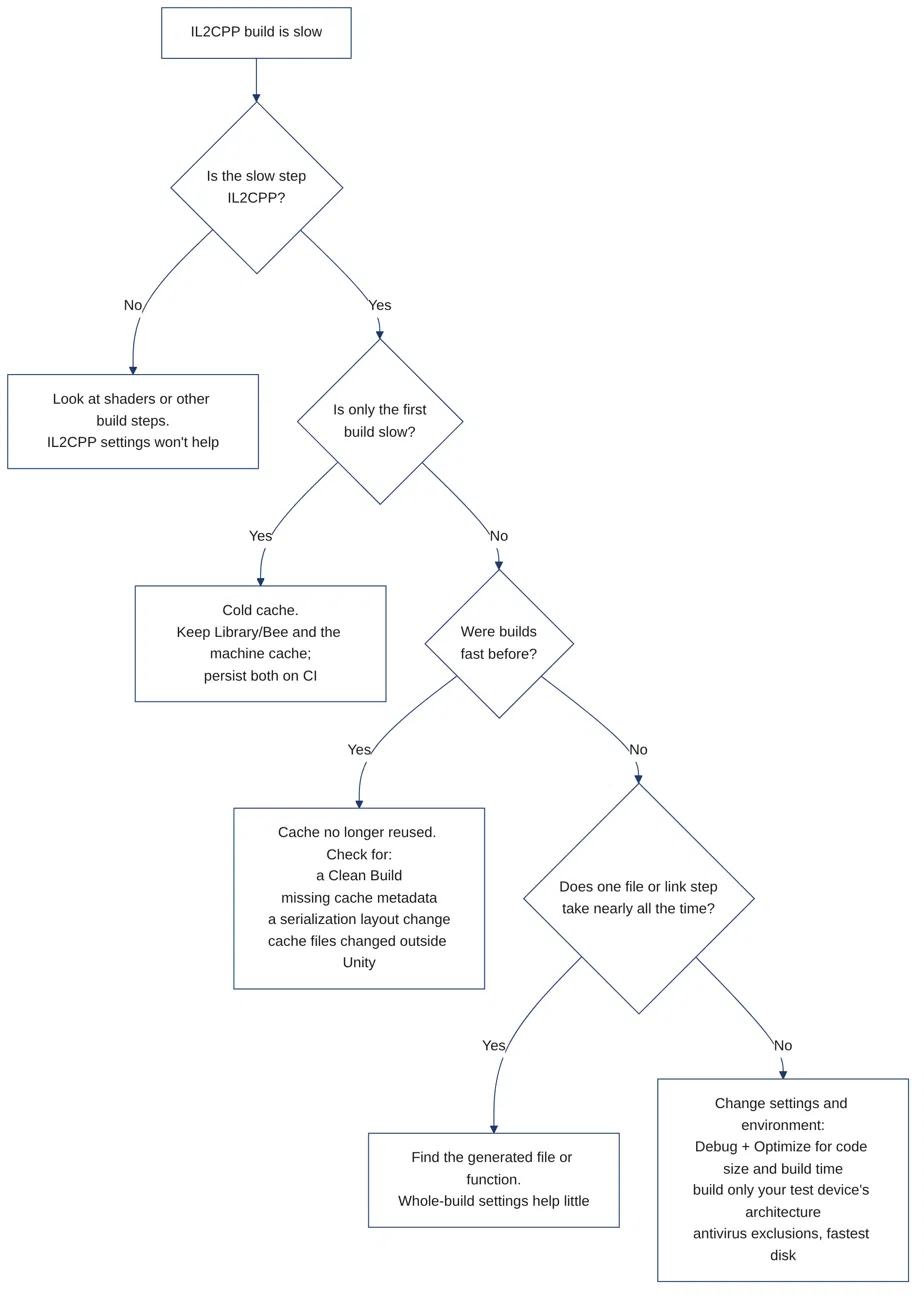
Illustrative decision flow based on Unity's documentation and developer reports.
Developers have reported all of these. One described a first Android build of over 2 hours with later builds finishing in about 5 minutes, and another described builds that jumped from about 30 seconds to 20 minutes.
Why Is the First IL2CPP Build So Slow?
The first IL2CPP build is slow because there is nothing to reuse yet, and the fix is keeping the cache, not changing settings. Unity's incremental build pipeline only rebuilds parts of the application that have changed since the previous build, and keeps most of what it reuses in the project's Library folder, especially Library/Bee. A machine-level cache, set by BEE_CACHE_DIRECTORY, also reuses libIL2CPP artifacts across projects.
On CI this can happen on every build, because a runner that starts from a fresh checkout has no cache to reuse. Persist Library/Bee and the machine-level cache between runs, and keep them out of version control, since Unity warns that modifying or deleting cache files outside Unity can cause issues.
Why Did My IL2CPP Build Suddenly Get Slower?
A build that suddenly got slower is often doing a full rebuild because the incremental cache is no longer reused. Work through these questions in order; each maps to a condition in Unity's incremental build documentation.
- Is something requesting a Clean Build? Check whether someone chose Clean Build in the Build Profiles window, or whether a build script or CI job passes
BuildOptions.CleanBuildCache. A flag left in a script turns every build into a full one. - Is the cache metadata still there? Look in
Library/PlayerDataCacheforScriptsOnlyCache.yamlandDataBuildDirtyInfo.json. If either is missing, Unity performs a clean build. - Did a script change its serialized fields? Adding a field to a
MonoBehaviourchanges the serialization layout, which rules out skipping the data build. - Does anything outside Unity touch
Library? Cleanup scripts, sync tools, or version control that modify or delete cache files can cause problems that a clean build then has to fix.
Teams also tend to run Clean Builds after changing a global setting that affects output, because Unity can otherwise reuse content it should have rebuilt. Deleting the Library folder likely forces the same full rebuild, since the cache lives there.
Some slowdowns have no identified cause. In the thread where builds went from about 30 seconds to 20 minutes, a forum reply said "the build cache is unexpectedly being cleared, but we cannot tell why", and the thread ended without a fix. If nothing on the list applies, run one Clean Build and check whether the builds that follow return to normal.
Which Settings Make IL2CPP Builds Faster?
The main IL2CPP settings that speed up builds are the Debug compiler configuration and the Optimize for code size and build time option. Both can make the game run slower, so use them for builds you iterate on, not for the build you ship. You can find them in the Player settings for your target platform.
| Setting | Effect on build time | What you give up | When to use it |
|---|---|---|---|
| C++ Compiler Configuration: Debug | Turns off all optimizations, so code is quicker to build | Code runs slower | Daily development |
| C++ Compiler Configuration: Release | Enables optimizations; takes longer to compile | Build time | Test builds |
| C++ Compiler Configuration: Master | Can take significantly longer than Release; on MSVC++ platforms, enables link-time code generation | The most build time of the three | Shipping builds, if the build time is acceptable |
| IL2CPP Code Generation: Optimize for code size and build time | Significantly reduces build times and binary size | Can reduce runtime performance | Iteration |
| IL2CPP Stacktrace Information: Method Name, File Name, and Line Number | Can increase build time and final size | — | Builds where you need line numbers |
| Antivirus exclusions and your fastest disk | IL2CPP conversion and compilation involve a large number of read/write operations | — | Every build machine |
Master's link-time code generation applies to MSVC++ platforms such as Windows, where one developer reported a link step of about 13 minutes. Another forum user traced a similar delay to Master and suggested Debug for development.
How much machine code IL2CPP has to produce drives how long it takes. Unity notes that including machine code in built applications generally increases both build time and size, and that Optimize for code size and build time produces less machine code. In the 2-hour first-build thread, another developer reported 10 minutes of total compilation on a 4-core notebook after switching to that option under its older name, "Faster (smaller) builds". Higher managed code stripping levels likely help too, by leaving IL2CPP less code to convert.
Target architectures add work the same way, since in practice each Android architecture is compiled separately. A 2019 forum report on Unity 2018.4 described 3.5 hours each for ARMv7 and ARM64, so build only your test device's architecture day to day.
Turn on line numbers only in builds you use to diagnose Android crashes, and leave them off in builds made only to check gameplay.
When one generated file takes nearly all the time, these settings help little. A forum reply about a Unity 6.1 build said such a case "almost always points to a degenerate case in the generated code for a C++ compiler". Look for very long generated C++ functions and trace them back to the managed code that produced them.
What Should You Use for Development vs Release Builds?
Use a fast configuration for daily development and keep Master and Clean Builds for release. Unity recommends Master for the shipping version if the increase in build time is acceptable, and recommends that you run a clean build when preparing an official build that will be released.
| Daily development | Test builds | Release builds | |
|---|---|---|---|
| C++ Compiler Configuration | Debug | Release | Master, if the build time is acceptable |
| IL2CPP Code Generation | Optimize for code size and build time | Optimize for runtime speed | Optimize for runtime speed |
| Stacktrace Information | Method Name | Method Name, File Name, and Line Number when chasing crashes | Your shipping choice |
| Target architectures | Your test device's only | Every shipping architecture | Every shipping architecture |
| Build type | Incremental | Incremental | Clean |
| What you give up | Runtime speed that matches the shipped game | Build time | Build time, by design |
A release build is slow on purpose, because a Clean Build does not reuse the project's incremental cache. Profile on a test build, since a daily development build does not run like the shipped game.
IL2CPP Build Time FAQ
Why is IL2CPP slower to build than Mono?
IL2CPP converts managed code to C++ and compiles it to machine code during the build, and including machine code in a built application generally increases build time. On Unity 6000.1, one developer reported an IL2CPP build that ran 1 hour and 15 minutes before failing, against under 4 minutes with Mono.
The conversion also produces a metadata file that ships alongside the native binary. Whether to protect that file is a separate decision from build speed, covered in what IL2CPP metadata encryption can and cannot do.
Should I delete the Library folder when builds get slow?
Not as a first step. Library holds the incremental cache alongside the Shader Cache and the AssetDatabase, so deleting it means a full rebuild and a full reimport. For a cache that is producing wrong results, Unity's remedy is a Clean Build.
Sources
- Introduction to IL2CPP — Unity Manual 6000.3
Il2CppCompilerConfiguration— Unity Scripting API 6000.3- Windows Player settings — Unity Manual 6000.6
- Incremental build pipeline — Unity Manual 6000.1
- Reducing the file size of a build — Unity Manual
- Build Analysis window reference — Unity Manual 6000.6
- IL2CPP build times — Unity Discussions (forum)
- Compiling cpp for libil2cpp takes too long — Unity Discussions (forum)
- "compiling cpp for libil2cpp" takes much longer suddenly — Unity Discussions (forum)
- 'Compliling cpp for libil2cpp' takes an extremely long time in Unity 6.1 — Unity Discussions (forum)
- IL2CPP build takes very long to compile GameAssembly.dll — Unity Discussions (forum)
- Android il2cpp build is too slow compared to iOS — Unity Discussions (forum)