To verify in-app purchases without missing or duplicating rewards, grant a reward only when Google Play reports the purchase as PURCHASED and your backend has verified it, record every grant against the purchase's purchaseToken, and confirm the purchase only after that grant is written. Missing rewards and duplicated rewards are two opposite failures of the same delivery pipeline: one comes from granting, confirming, or waiting in the wrong place, the other from confirming late and not checking what was already granted.
Five rules cover the core of it. Each one maps to a step in the purchase lifecycle, and each failure in the troubleshooting table traces back to one of them being skipped or done out of order.
- Grant only on
PURCHASED. A purchase in thePENDINGstate does not get a reward yet. - Verify on your backend before granting. The client sends the
purchaseToken; the server decides. - Key every grant on
purchaseToken. It is globally unique;orderIdis not reliable for this. - Write the grant and the record together. A reward without a record is a reward that can be granted again.
- Confirm after the grant, not before. A purchase that is never confirmed is refunded automatically after three days.
The scope here is Google Play with Unity IAP 5, for one-time products and consumables. Subscriptions, iOS, and other stores follow different rules and are not covered.
The Lifecycle of an In-App Purchase on Google Play
Reward problems in this area map to specific steps in the order a purchase is handled. Google Play's one-time purchase lifecycle gives the server-side sequence: check that the purchase state is PURCHASED, verify the purchase, give the user access to the content, then acknowledge or consume it.
- Check the state. Grant entitlement only when the purchase state is
PURCHASED, and do not grant it while the state isPENDING. Granting early is where a reward can go out for a purchase that never completes. - Send the token to your backend and verify it. Google's fraud guidance says to send the
purchaseTokento your backend and keep a record of everypurchaseTokenvalue. If the client crashes before this step, nothing is lost yet: the purchase has not been confirmed, and Unity IAP redelivers an order that stays pending throughOnPurchasePendingthe next time it initializes. - Grant the reward and record the token. This is where duplicates are prevented or allowed. A grant with no matching record means the next delivery of the same purchase looks new.
- Acknowledge or consume. Acknowledgment is required and should happen immediately after granting entitlement. For consumables, consuming the purchase also acknowledges it. In Unity, this is the call to
ConfirmPurchase. - Unconfirmed purchases expire. If a purchase is not acknowledged within three days, the user automatically receives a refund and Google Play revokes the purchase.
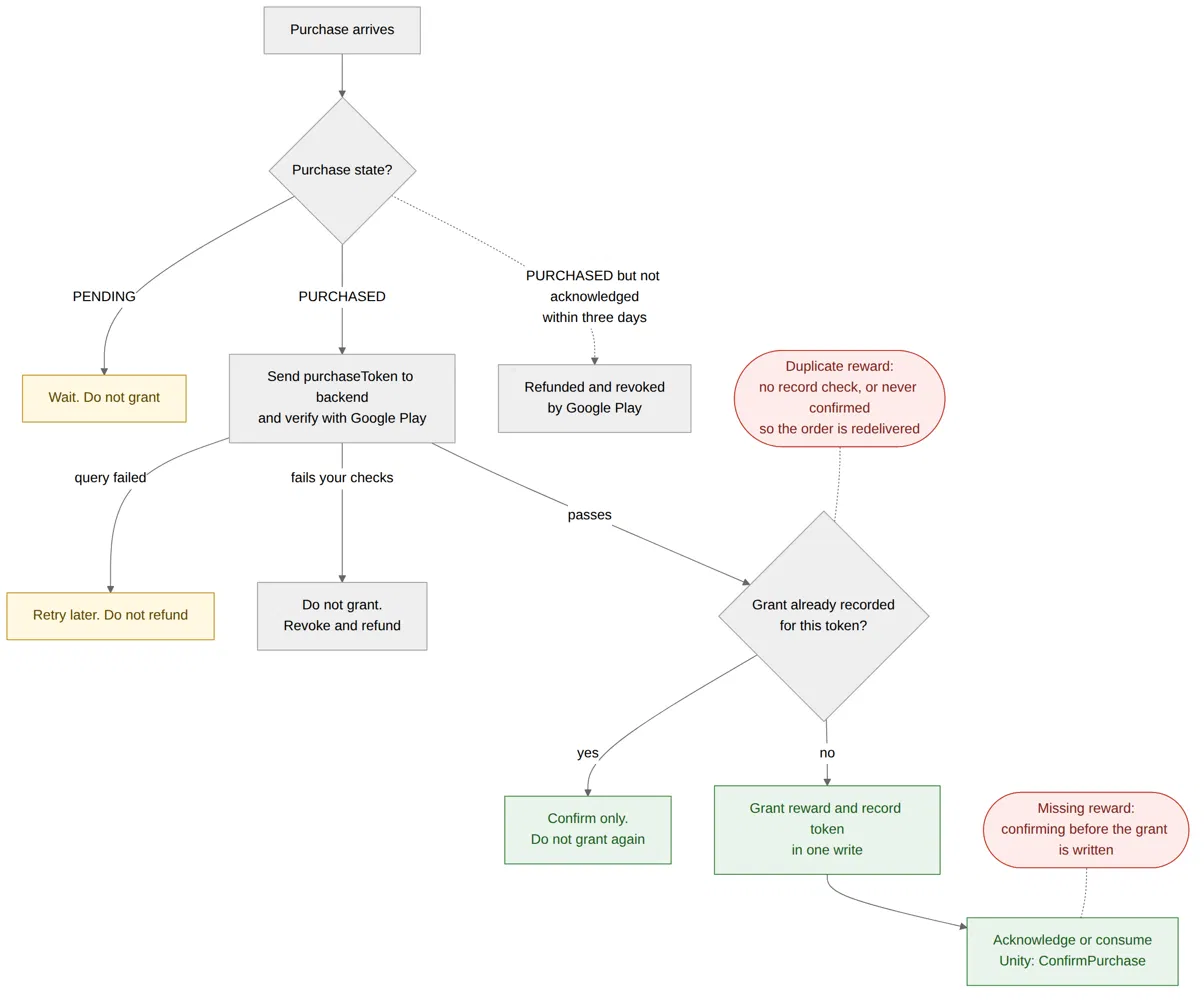
Illustrative diagram based on Google Play and Unity IAP documentation.
Read as a pipeline, the two failures sit at opposite ends. Confirming at step 4 before the grant at step 3 has been written is how a player pays and receives nothing: Unity stops redelivering an order through OnPurchasePending once it is acknowledged, and a consumable is not returned once it is acknowledged. Skipping the record at step 3, or never reaching step 4, is how one payment becomes two rewards, because an unconfirmed purchase keeps coming back.
Unity Order States vs Google Play Purchase States
Unity IAP 5 and Google Play both use the word "pending", and they mean different things by it. Unity's purchase documentation defines its states this way: Pending means the purchase has been paid but not yet fulfilled, and Deferred means the purchase is waiting for payment.
| Unity order type | Unity's definition | Closest Google Play state by definition |
|---|---|---|
PendingOrder |
Paid but not yet fulfilled | PURCHASED, not yet acknowledged |
DeferredOrder |
Waiting for payment | PENDING |
Unity's PendingOrder is not Google Play's PENDING. Going by the two sets of definitions, a PendingOrder corresponds to a purchase that is already paid and is waiting for you to grant and confirm it, while Google's PENDING lines up with Unity's DeferredOrder. The table is a reading of both definitions side by side, not a mapping either vendor publishes. A team that treats every PendingOrder as "not paid yet" can hold back rewards players have paid for.
Missing or Duplicated Rewards: What to Check First
The table is organized by what a support ticket or a backend dashboard shows. Google's and Unity's documentation supply the rules behind each action; the order of checks is an editorial arrangement for working through a ticket quickly.
| Symptom | Check first | What to do |
|---|---|---|
| Player paid and received nothing | Is the purchase PURCHASED or PENDING? In Unity, did it arrive as a PendingOrder or a DeferredOrder? Was it confirmed before the grant was written? |
PENDING or DeferredOrder: wait, and grant when it completes. Confirmed with no grant: grant it from your backend after checking the purchase with Google Play, because Unity does not redeliver an acknowledged order through OnPurchasePending |
| The same purchase triggers again on launch | Did the OnPurchasePending handler crash, or exit before ConfirmPurchase? Is your duplicate check keyed on the purchase across sessions? |
Look the purchase up in your grant records. If it was granted, confirm it without granting again |
The same purchaseToken reaches your backend more than once |
Does a grant already exist for this token? | Return the existing result. A repeated token is not, by itself, evidence of abuse |
A rise in CANCELED purchases |
Are rewards being granted while the purchase is still PENDING? |
Grant only on PURCHASED |
| Confirmation failed | Was the reward already granted? What FailureReason came back? |
Do not grant again. Keep the original PendingOrder and retry according to the reason |
| Verification failed | — | Do not grant, acknowledge, or consume. Revoke and refund the purchase |
| Item still owned after a refund or chargeback | Does the Voided Purchases API list the purchase? | Claw back the associated content |
| Rewards go out before verification | Does the grant happen before the state check and backend verification? | Move the grant after both |
The first row is the one players feel most directly, and it can draw a response from Google. In one case posted to Unity Discussions in April 2022, a developer shared a Google notice saying some payment methods had been turned off for their app, with the reason given as: "We've noticed that you don't always acknowledge the delivery of in-app content to users after they've paid outside your app. Or you don't integrate pending transactions correctly." A single post does not show how often this happens, but it does show what the consequence can look like.
The second row is the duplicate that Unity documents directly. If the app crashes while the OnPurchasePending handler is running, the handler is invoked again the next time Unity IAP initializes, and Unity's warning is that without de-duplication logic of your own, this can grant the same item more than once. Unity's purchase documentation says it re-invokes OnPurchasePending for an unacknowledged order on later FetchPurchases calls or at session start, while its SDK guide adds that within one session, FetchPurchases does not re-trigger orders already seen. Either way, a restart after a crash is a new session, and that is the case your own check has to cover.
The third row is where a second source helps and a common misreading starts. Google's guidance is to verify that the current purchaseToken does not match any previous one. Heroic Labs' Nakama documentation goes a step further and returns a seenBefore flag, noting that a receipt already validated "may be a replay attack or legitimate re-validation" — and it gives no way to tell those two apart. Your grant records make the distinction unnecessary for the reward decision: if a grant exists for the token, return the original result, not a second reward and not an automatic refund.
The fourth row reads like fraud but need not be. Google's fraud page says that a spike of CANCELED purchases may mean you are granting entitlements while purchases are still PENDING, which makes it a signal about when you grant rather than about who is buying.
The sixth row has a specific instruction attached. If a purchase fails your validation or abuse checks, Google's guidance is not to grant, acknowledge, or consume it, and to explicitly revoke and refund it instead of letting it expire. For one-time products that means the Orders:refund endpoint with revoke set to true; Google's reason is that an automatic refund for lack of acknowledgment "is ambiguous since it can also result from a processing timeout."
When to Grant, Wait, or Reject a Purchase
Most purchase decisions come down to a short list of situations. The action in each row follows the Google and Unity documentation; the arrangement into a single table is editorial.
| Situation | Action |
|---|---|
Google Play state is PENDING (Unity DeferredOrder) |
Wait. Do not grant |
PURCHASED, verified, no grant recorded for this token |
Grant, record, then confirm |
PURCHASED, grant already recorded for this token |
Do not grant again. Confirm |
Confirmation failed with StoreNotConnected |
Retry the confirmation after the store reconnects |
Confirmation failed with ProductUnavailable because the order passed was null |
Do not retry. Pass the PendingOrder that OnPurchasePending delivered |
Confirmation failed with Unknown because the order has no order information or transaction ID |
Do not retry. The order cannot be confirmed in this state |
Confirmation failed with Unknown from an unexpected error |
Retry the confirmation |
| Purchase failed your verification or abuse checks | Do not grant or acknowledge. Revoke and refund |
| Purchase voided after the reward was granted | Claw back the associated content |
Unity reports Unknown for two different causes with opposite recoveries, so the cause, not the reason code alone, decides whether to retry. Unity's own example handler logs both FailureReason and Details for a failed confirmation, which keeps the information you need when reviewing one later.
A failed confirmation is not a reason to grant again. Unity's documentation states that a failed confirmation does not reverse the purchase or revoke the reward you granted, that Unity IAP keeps the order pending until a confirmation succeeds, and that the reward should not be granted again. To retry, keep the original PendingOrder: OnPurchaseConfirmed delivers a FailedOrder in its place, and that failed order cannot be passed back to ConfirmPurchase.
Two kinds of failure are easy to confuse here. A purchase that fails your verification is a decision about the purchase, and it ends in a refund. A failed request to Google Play while checking a purchase is a temporary condition, and it should end in a retry rather than a refund. If you call the Play Billing Library directly rather than through Unity IAP, Google's response code guidance classifies codes such as SERVICE_UNAVAILABLE, SERVICE_DISCONNECTED, and NETWORK_ERROR as retriable. That guidance covers client-side Billing Library calls; it does not address retries for your backend's own verification requests.
For refunds and chargebacks after the fact, Google's Voided Purchases API returns purchases that have been canceled, revoked, or charged back, along with the reason and any associated content you can claw back. Voided purchases with no associated clawback content are not exposed by it.
A Minimal In-App Purchase Verification Flow
Unity's official sample grants every item in the order and then confirms it, with no check for whether the order was already handled, and the documentation leaves de-duplication to you. The sketch adds only that missing part. It is illustrative: it has not been compiled or tested, the backend calls to the Google Play Developer API are shown as pseudocode, and the duplicate check and single-write grant are engineering suggestions rather than requirements written into Google's or Unity's documentation.
The client hands the decision to the backend and confirms only when the backend says the reward exists. Anything else leaves the order unconfirmed, which is the state Unity redelivers.
// Illustrative sketch — not compiled, not tested.
void OnPurchasePending(PendingOrder order)
{
    // SendToBackend is your own call. It sends the purchase token
    // and product ID to your server and returns the server's decision.
    SendToBackend(order, decision =>
    {
        if (decision == Decision.Granted || decision == Decision.AlreadyGranted)
        {
            m_StoreController.ConfirmPurchase(order);
        }
        // Any other decision: do not confirm. An unconfirmed order
        // is redelivered through OnPurchasePending on the next initialization.
    });
}
The backend owns the record, and the grant and the record are written together so that a crash cannot leave one without the other. Making purchase_token a unique key in the grants table lets the database reject a second grant even when two deliveries of one purchase arrive at the same moment.
// Illustrative pseudocode — not compiled, not tested.
handle_purchase(purchase_token, product_id, player_id):
    purchase = query Google Play for purchase_token
    if the query failed:
        return RETRY                        // temporary: do not refund
    if purchase.state == PENDING:
        return WAIT                         // do not grant
    if purchase.state != PURCHASED:
        return REJECTED                     // do not grant
    // e.g. the product matches the item requested,
    // and the purchase belongs to this player
    if not passes_your_checks(purchase, product_id, player_id):
        revoke and refund purchase_token    // Orders:refund with revoke = true
        return REJECTED
    in one database transaction:
        if grants contains purchase_token:
            return ALREADY_GRANTED
        insert grant(purchase_token, player_id, product_id)  // purchase_token: unique key
        add product_id to player_id inventory
    return GRANTED
Two details in the documentation shape this. The sketch confirms from the client, which Unity's server-side workflow allows; Google recommends acknowledging and consuming from your backend instead, noting that while the client can do it, server-side APIs provide additional protection against issues like poor network connectivity and malicious activity. Unity notes that once a consumable is acknowledged, the store does not return it again, and its guidance is direct: "Always persist consumable rewards remotely." Your own records are the only place a past consumable grant can be looked up.
What Purchase Verification Cannot Do
Server-side verification assumes the game client forwards purchases honestly, and a client can be modified. A check that runs in the client can be removed from the client, which is why the decision to grant belongs on the backend and the client's job ends at forwarding the purchase and confirming when told to. What can still be trusted inside a process once an attacker is attached to it is a separate question, covered in what in-process checks can still do after attach.
Verification also does not stop every form of abuse. It establishes that a purchase is in the right state and has not been granted before, at the moment you check. Refunds and chargebacks that arrive later are what the Voided Purchases API exists for, and how you respond to them — clawing items back, restricting purchases, or something else — is a policy choice for your game.
In-App Purchase Verification FAQ
Should I use orderId or purchaseToken to detect duplicate purchases?
purchaseToken. Google's guidance states that purchaseToken is globally unique and safe to use as a primary key, and that orderId should not be used to check for duplicates because not all purchases generate one — purchases made with promo codes do not.
Why does OnPurchasePending fire again after I restart the game?
If the app crashed while the handler was running, Unity IAP invokes it again the next time it initializes. Unity's purchase documentation also says it re-invokes OnPurchasePending for an unacknowledged order at session start, while its SDK guide adds that within one session, orders already seen are not re-triggered. A restart is a new session, so the duplicate check has to live in your own records.
Sources
- Fight fraud and abuse — Google Play Billing
- One-time purchase lifecycle — Google Play Billing
- Handle BillingResult response codes — Google Play Billing
- Purchases — Unity In-App Purchasing
- Fulfill purchases through the SDK — Unity In-App Purchasing
- In-app Purchase Validation — Heroic Labs (vendor documentation)
- Google disabled the payment method because of pending transactions — Unity Discussions (forum, 2022)